Related: Soundbar Placement: Where a Bar Actually Belongs in a Small Room
Most of the service calls I run are not about broken gear. They are about a soundbar sitting on the floor, a subwoofer jammed into a corner, or a projector throwing onto a bare white wall with a window directly behind it. I spent my first eight years on a big-box install crew pulling wire through Austin attics, and fifteen years and roughly 340 installs later, the diagnosis has barely changed. The room is usually the problem. The gear is usually fine.
That is the whole idea behind a budget home theater setup. You are not hunting for the cheapest boxes on the page. You are buying four pieces that solve four separate problems, and then placing them like you mean it. Get placement right and a modest bar will embarrass a flagship that is aimed at the drywall. Get it wrong and no wattage number on a sticker will rescue the dialogue in a mumbly British crime drama.
Here is the order I would buy in, and what each piece actually does.
Best Overall for Most Rooms: 2-in-1 Detachable Soundbar
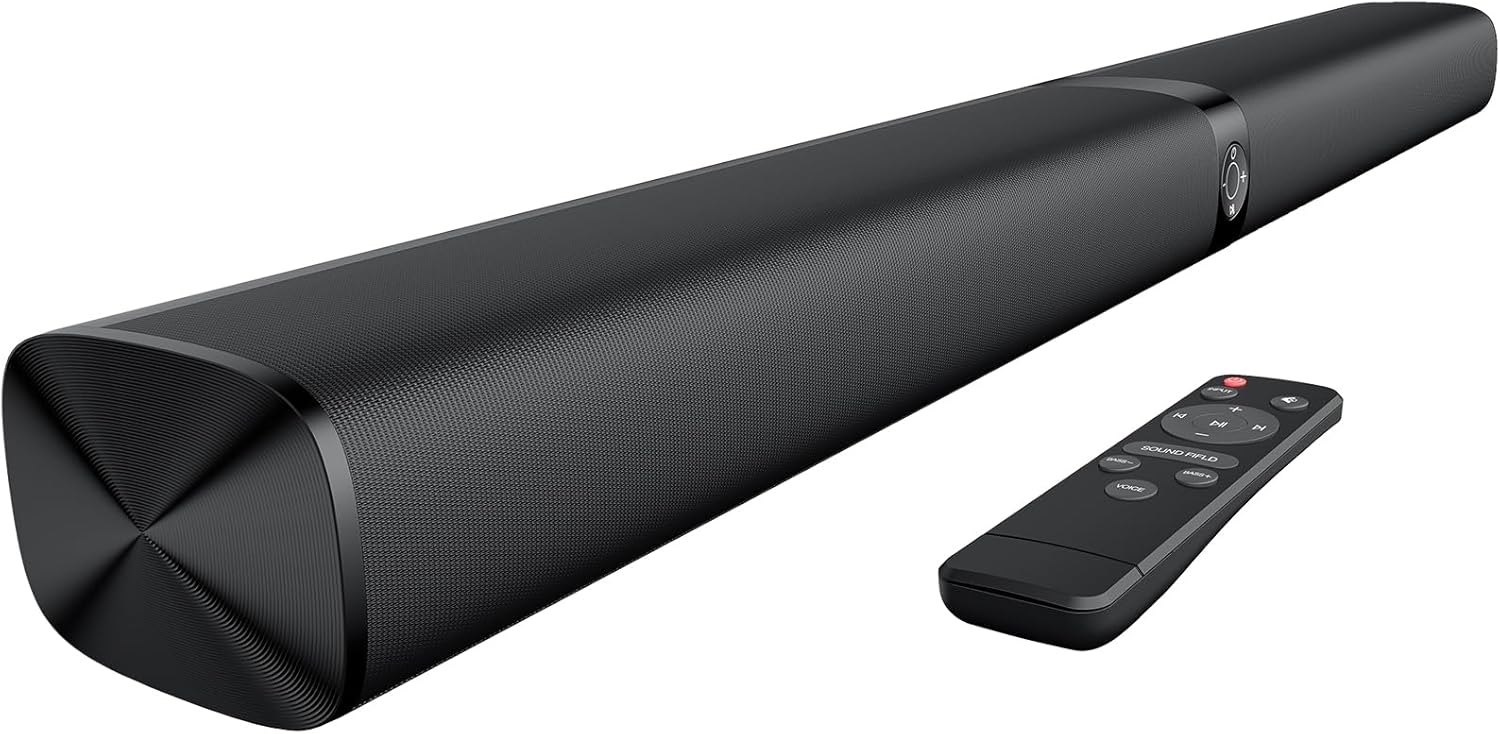
The Sound Bar for Smart TV is where I would start, and the 2 in 1 detachable design is the reason. Most bars in this class are one sealed box, which means the left and right channels sit maybe eighteen inches apart and stereo collapses into a single blob somewhere in front of the TV. Split this one into two pieces and you can put real distance between the halves under the screen. That is the difference between hearing a car door slam on the left and hearing it vaguely forward.
The connections cover nearly every TV made in the last decade: ARC, optical, AUX, and Bluetooth. ARC is the one you want, because it lets the TV remote handle volume so nobody in the house has to learn a second remote. Optical is the fallback when ARC handshakes go sideways, which happens more often than the forums admit. Bluetooth is for phones and for projector nights, and it is the reason this bar pairs well with the small projector further down this list.
Auto volume boost is a feature I use in clients' houses, because it flattens the gap between a whisper-quiet dialogue scene and a commercial that arrives at triple the level. The three equalizer modes are there if you want them, and my standing advice is to leave the bar in flat or standard. Movie and surround modes on budget bars tend to hype the midrange, and the midrange is exactly where dialogue lives. Boost the bass, scoop the presence band, and every actor sounds like they are talking through a blanket.
Placement rules are the same as always. Front edge of the stand, not pushed back against the wall, tweeters as close to seated ear height as the furniture allows. If the bar ends up below the TV, it belongs at the front lip, never on the floor.
Best for a Bedroom, Dorm, or Backyard: Mini Projector with Wifi and Bluetooth
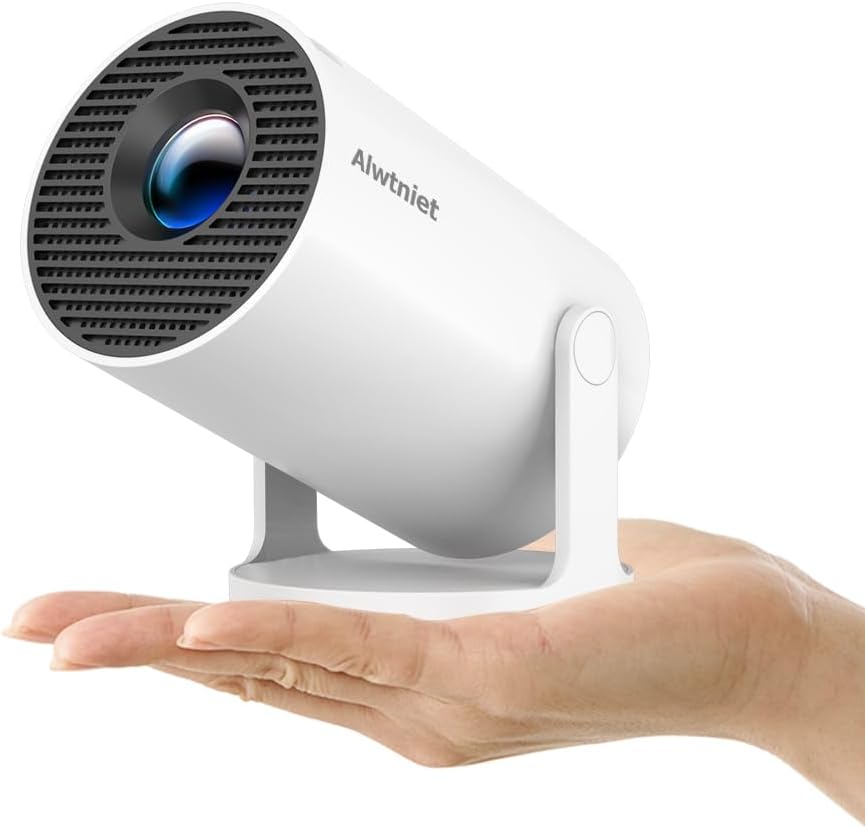
A Mini Projector with Wifi and Bluetooth is a different animal from a TV, and it solves a problem a TV cannot: a huge picture in a room that has no wall space for a 65-inch panel. The HY300Pro runs Android 14, connects over wifi and Bluetooth, supports 4K sources, and works with HDMI, USB, a streaming stick, a phone, or a laptop. Auto keystone means you can set it on a nightstand at an angle and it will square the image up without you crawling behind the furniture.
Two things to plan for. First, light. Every projector fights ambient light and loses, so a bedroom after dark or a backyard after sunset is where this class makes sense. Second, sound. Built-in speakers in a projector this small exist to confirm the picture is on, not to carry a movie. Pair it with the bar over Bluetooth or run HDMI from a streaming stick into the projector and let the bar do the talking.
On color, keep your expectations calibrated along with the picture. I calibrate projectors with an i1Display Pro in Calman against Rec.709, and budget projectors almost never arrive close to the standard out of the box. You can improve a lot with the picture presets, contrast, brightness, and color temperature controls, but buy this for image size and portability, not for cinema-grade color. Anyone selling you cinema-grade color at this price is selling you a press release.
The Cable That Decides Whether ARC Works: Silkland 8K HDMI ARC/eARC 2.1
This is the least exciting purchase on the list and the one most likely to waste your Saturday afternoon. The Silkland 8K HDMI ARC/eARC Cable 2.1 for Soundbar is 6.6 feet and rated for 8K at 60Hz and 4K at 120Hz, which is far more bandwidth than a TV-to-bar run will ever need. That headroom is the point.
ARC and eARC are HDMI features, and they depend on the cable actually carrying the audio return channel. A marginal cable will pass video perfectly and still refuse to send audio back to the bar, which is the failure mode that convinces people their TV is broken. I just re-terminated a 30-foot run for the third time because it failed a 48 Gbps pattern test at the 24-foot mark. Length is the enemy here. At 6.6 feet you are in the easy zone, which is exactly why I keep short cables on hand for TV-to-bar connections and stop trying to make one long cable do both jobs.
Buy the short cable, keep the run direct, and skip the wall plate in the middle.
When to Skip the Bar: Energy 5.1 Take Classic Home Theater System
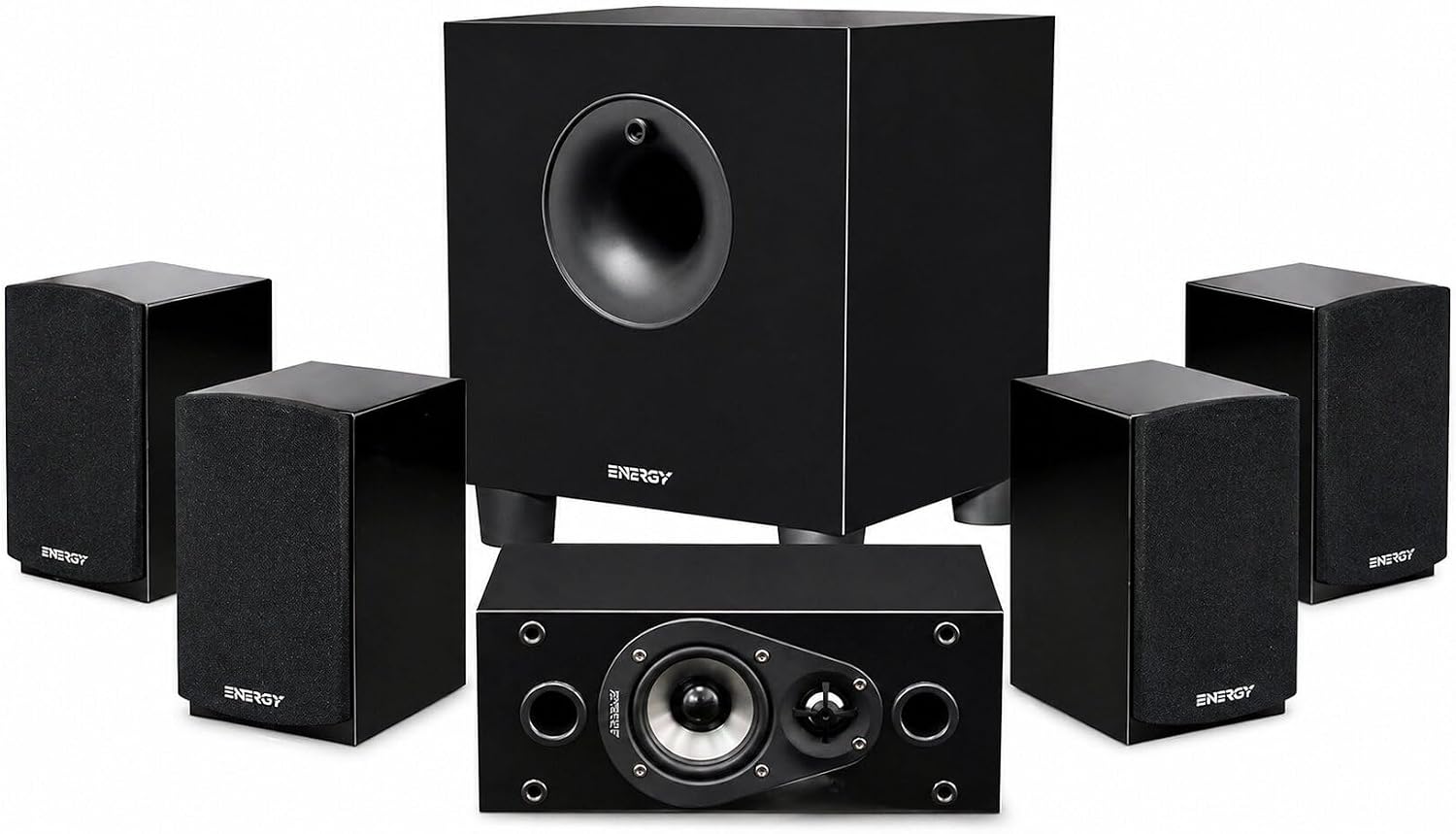
The Energy 5.1 Take Classic Home Theater System, a set of six in black, is the option I bring up when someone says they are building a dedicated room and then asks which soundbar to buy. My answer is usually none. A set of six means five channels plus a subwoofer, driven by a real AV receiver, and that will beat any bar at any price on channel separation, because the speakers are physically where the mix wants them instead of bouncing off a ceiling and hoping.
The catch is commitment. This is a speaker package, not a powered bar, so you supply the AV receiver and the speaker wire, plus stands or brackets for the surrounds. You also need a room where you can actually put speakers behind and beside the seats. In an apartment with a tile floor and shared walls, that is a lot of furniture and cabling for a modest gain, and the bar wins on simplicity.
In a dedicated room, this is the direction I point people, and I say it even when it costs me the easier sale. A bar is a compromise that works beautifully in a living room. It is still a compromise.
How I judge gear like this
The standard for anything that lands in my living room is a UMIK-1 sweep from the actual seat, before and after the bar's room correction runs, logged in a spreadsheet that passed 400 entries a while back. I check where the 1 to 4 kHz presence band sits, because that range is dialogue, and I check what happens at 60 percent volume, because that is where total harmonic distortion climbs on bars that advertise big wattage. The sub gets moved to four corners with a 50 Hz sine and a tape measure before I decide where it lives. Projectors get calibrated against Rec.709, and cables get run through a pattern test.
You can copy most of the useful parts without a microphone. Sit in the seat you actually use, play a scene you know by heart, and listen for whether dialogue stays intelligible when the music swells. Walk the room and note where the bass piles up, usually a corner or against the wall behind the couch. Move the sub two feet and listen again. Raise the bar to ear height with a couple of books and hear what changes. Measure your projector throw distance with a tape before you commit to a mount. None of that costs anything, and it catches the majority of problems I get called about.
What the four pieces actually solve
If you are starting from nothing, buy in this order. The detachable bar first, because it fixes the biggest complaint in most households, which is dialogue. The HDMI cable second, because a short, known-good ARC run removes an entire category of ghost problems. The projector third, if you have a second room that needs a big picture, a bedroom, a dorm, or a backyard. The 5.1 speaker package last, and only if you have a dedicated room, an AV receiver, and the patience to run wire.
What I would not do is spend the whole budget on one hero component. A great bar in a bad spot loses to a modest bar in a good one every single time. The room is the system.
The budget home theater setup reference table
This is the short version I keep for clients, with each piece and what it is for.
| Product | Role in the setup | Connection | Best for | Price |
|---|---|---|---|---|
 Visit on Amazon → Sound Bar for Smart TV (2 in 1 detachable) |
Main audio for most rooms | HDMI ARC, optical, AUX, Bluetooth | Apartments, bedrooms, first setups | $58.82 |
 Visit on Amazon → Mini Projector with Wifi and Bluetooth (HY300Pro) |
Big picture in a small space | HDMI, wifi, Bluetooth | Bedrooms, dorms, backyard nights | $49.99 |
 Visit on Amazon → Silkland 8K HDMI ARC/eARC Cable 2.1 for Soundbar |
Carries audio back from the TV | HDMI ARC or eARC | Any TV plus bar pairing | $15.99 |
 Visit on Amazon → Energy 5.1 Take Classic Home Theater System |
Real 5.1 separation | AV receiver and speaker wire | Dedicated theater rooms | $252.42 |
Should you buy the detachable soundbar?
Yes, for most rooms. It handles ARC, optical, AUX, and Bluetooth, which means it works with nearly any TV, and splitting the 2 in 1 design into two halves buys you stereo separation that a sealed bar cannot match. Leave it in flat or standard mode, place it at the front lip of the stand near ear height, and let auto volume boost handle the commercial jumps. If you watch more television than movies and you live in a normal room, this is the piece to buy first.
Should you buy the mini projector?
Buy it for the room where a TV does not fit or does not belong, and buy it knowing two things. It needs a dark room to look its best, and it needs the bar for sound. If you want a movie night that feels bigger than the wall, this is the cheapest legitimate way to get there. If you want a calibrated picture with deep blacks, save for a TV instead.
Should you buy the HDMI cable?
Yes, and buy it before you need it. Short ARC runs are where the technology works, and having a known-good 6.6 foot cable on hand turns a frustrating afternoon into a two-minute swap. Skip the wall plate, keep the run direct, and stop blaming the TV for an audio handshake that a marginal cable caused.
Should you buy the Energy 5.1 system?
Only if you are building a room for it. Add the AV receiver and the wire to your budget, plan where the surrounds go before you order, and accept that this is a project rather than a purchase. In a dedicated room it will outperform any bar I have ever swept. In a shared living room, it will lose to the bar on placement, simplicity, and family harmony.